3D printing quoting software.
Prepare customer quotes using your own material, machine, and labor costs. 3DPCC helps makers and small print shops choose a selling price, save the calculation, and share a branded PDF.
Include the full job cost
Account for materials, machine time, labor, parts, and packaging.
Set a selling price
Choose a margin and review the suggested price before sharing it.
Find quotes for repeat work
Look up previous projects and review the costs and prices you saved.
Find saved quotes and review their costs.
Search by project name and open a quote’s cost breakdown. When a customer requests more of the same part, use the previous job as a reference and check current costs before quoting again.
| Project | Date | Weight | Print time | Margin | Cost | Suggested price | Status |
|---|---|---|---|---|---|---|---|
| Cyberdeck Terminal ChassisFDM | 12/09/2026 | 412 g | 24h 15m | 50% | $34.32 | $68.64 | Pending |
| Custom Camera MountFDM | 11/09/2026 | 75 g | 10h 10m | 50% | $5.61 | $11.22 | Accepted |
| Enclosure Corner Bracket SetFDM · 20 units | 11/09/2026 | 614 g | 20h | 60% | $21.33$1.07 / unit | $53.40$2.67 / unit | Accepted |
| Wall Mount for Power SupplyFDM | 10/09/2026 | 75 g | 5h 23m | 80% | $10.04 | $50.20 | Draft |
Simplified product preview · Sample data · USD
Estimate print costs and prepare customer quotes.
Enter materials and print time
Take material usage and print time from your slicer. Select your saved material and printer profiles, then include hands-on labor, hardware, and packaging.
Choose your profit margin
Review the cost breakdown and choose a margin to calculate a suggested selling price. Check the quantity and what is included, whether the quote is for one part or a batch.
Save the quote and export a PDF
With PRO, save the calculation in quote history and export a PDF with your business details. Keep the original quote available so you can review it when the customer returns.
See what goes into your 3D printing price.
3D printing job costing includes more than filament. This camera mount needs machine time, hands-on labor, two inserts, and a box. Each of those costs contributes to the price.
The sample costs $5.61 to make. At a 50% margin, the selling price is $11.22 before tax, leaving $5.61 after the included costs. Margin is calculated from the selling price; adding a 50% markup to cost would give a different result.
- Include electricity, maintenance, and printer depreciation
- Add hands-on labor as well as print time
- Include parts and packaging in the same calculation
75 g · Bambu Lab P2S · 10h 10m
- Material
- $2.25
- Machine
- $0.61
- Labor
- $1.50
- Hardware
- $0.50
- Packaging
- $0.75
- Total cost
- $5.61
$5.61 profit
Sample calculation · USD · Before tax
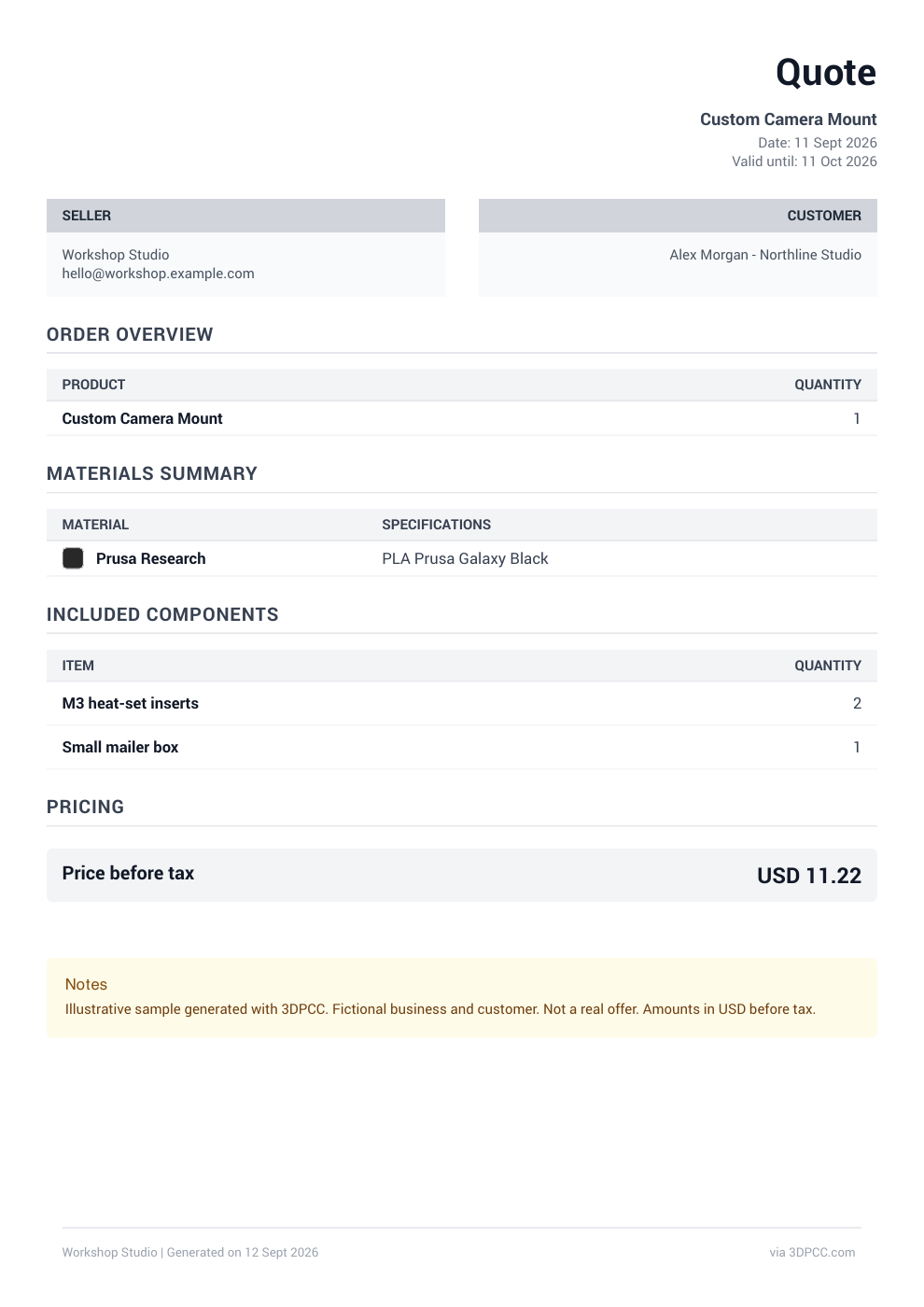
Share a branded PDF quote with your customer.
Add your business details and choose which information to include. Export a PDF with the job details and price, ready to send to your customer.
This sample shows the camera mount’s materials, components, and $11.22 price before tax. We have left out the internal cost breakdown using the export options. Your saved calculation keeps those costs available for your own reference.
View the sample quote PDFFrom a print estimate to a price you can send.
Start with material usage and print time from your slicer. Add your material prices, machine costs, and hands-on work to find what the job costs your business.
3D printing pricing software helps with the next decision: what to charge. Choose a margin, review the price for the requested quantity, and save your quote. The branded PDF gives your customer the details you choose to share, while your internal cost breakdown stays available for later.
Need a starting format for a customer quote? Use our free template to record the material, quantity, agreed scope, and price before you send it.
Get the 3D printing quote templateInventory, quotes, and orders in one plan.
3DPCC PRO includes your inventory, saved quotes, PDF exports, products, customers, and orders. Your web subscription also includes PRO on iPhone and iPad.
Compare Free and PROQuestions about 3D printing quotes.
Job costs, profit margins, saved quotes, and PDF exports explained.
Ask us a questionHow does 3DPCC calculate a 3D printing quote?
3DPCC adds material, machine, labor, hardware, and packaging costs. Machine costs include electricity, maintenance, and a share of the printer’s purchase cost based on its expected working life and use. Your chosen profit margin then determines the suggested selling price. Review your inputs and quantity before sharing the quote.
Do I upload an STL file to get an instant quote?
No. 3DPCC is 3D printing estimating software that uses the print time and material usage from your slicer. Enter those figures, add your business costs, and choose a margin to prepare the quote.
Can I create FDM, resin, and batch quotes?
Yes. 3DPCC supports FDM and resin cost estimates. PRO adds saved material and printer profiles, batch pricing, quote history, and PDF exports. Check the batch quantity and the price per unit before sending a quote.
What is the difference between margin and markup?
Margin is profit as a percentage of the selling price. Markup is the amount added as a percentage of cost. A $10 cost needs a $20 price for a 50% margin. Adding a 50% markup instead gives a $15 price.
Can I export a quote with my business branding?
Yes. With PRO, add your business branding and choose which details to include in the PDF export. You can share a customer quote while keeping the detailed internal costs in your saved calculation.
Can I find a previous quote for a repeat job?
Yes. Search your PRO quote history by project name and open the cost breakdown. Use the saved details as a reference, then check today’s material costs and the new quantity before quoting the repeat job.
How is this different from the free cost calculator?
The separate free calculator helps you estimate a job. 3DPCC PRO keeps your material costs, printer profiles, and quotes available between jobs, and adds branded PDF exports and business management tools. Open the free 3D printing cost calculator.